


Manage bookings
Configure and manage court bookings for your members
Booking types
Plugin.ch manages two distinct booking types, suited to your different needs:
Booking by a member
Members can book a court to play directly through the dedicated interface. The booking duration is automatically determined by their subscription type. Administrators and managers can also book a court on behalf of a member.
Booking by a coach or committee member
Coaches (for lessons) and committee members can also make bookings. For these users, the booking duration is set manually at the time of creation, offering maximum flexibility for structured activities.
💡 Tip: The restrictions configured in your club's settings control the exact booking rules based on subscription type. They define the lead times, allowed durations, forbidden time slots, and many other conditions.
Identifying members
For your members to access the system and book their courts, they must be correctly identified in Plugin.ch.
Assigning credentials
Each member receives a unique username and password that allows them to access the booking interface. The administrator or club manager assigns these credentials when creating the member profile.
Accessing credentials in Plugin.ch
Each member's username and password are visible on the member's detail sheet, in the "Username" and "Password".
See the image below to locate this information:
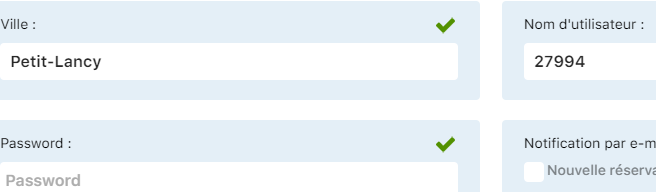
"Username" and "Password" fields on the member's sheet
Editing credentials
If a member has forgotten their password, you can change it directly in the "Password" field on their sheet. You can also change their username at any time if needed.
⚠️ Important: Keep a secure record of your members' credentials and encourage them to change their password on first login. Access security helps protect your club's data.
Booking settings
The general settings that govern the booking system (lead times, durations, restrictions, etc.) are configured in the dedicated club settings section.
Centralized configuration
For a complete overview and detailed instructions on configuring booking settings, see the chapter "Manage settings" of this guide.
💡 Tip: Take the time to properly configure your booking settings before making the system available to your members. A configuration suited to your specific needs avoids last-minute adjustments and ensures a smooth user experience.
In particular, check the booking lead times, the durations allowed depending on subscriptions, and the restrictions related to special time slots or events.
What's next?
Now that you have mastered the administrative management of bookings, find out how your members access the system and make their own bookings. The chapter "Member access" (Chapter 21) will show you the end-user interface.
Plugin.ch Tutorials — Manage bookings