


List of bank payments
Category: Process payments
Plugin.ch offers a dedicated module for viewing the complete history of bank payments received. This feature lets you generate detailed reports, check payments received over a period, and have reliable evidence for your accounting. This tutorial explains how to access and use this list.
1 Access the payment list
Step 1: Access the Invoice menu
From the main Plugin.ch menu, select INVOICE to access invoice and payment management options.
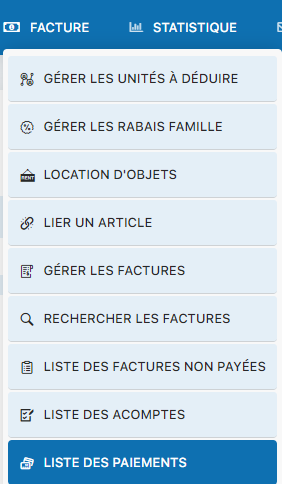
Step 2: Click LIST OF PAYMENTS
The submenu displays several options. Select LIST OF PAYMENTS to access the history of all payments imported from your bank files.
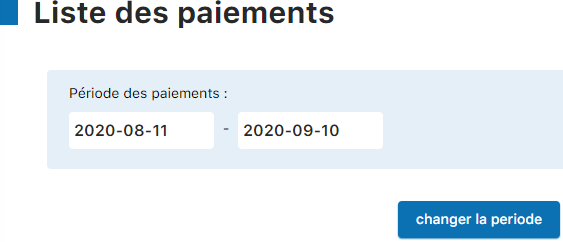
Step 3: Select a period
The payment list page is displayed. By default, it shows payments for a predefined period. To view a different period, click the button or link “Change period”.
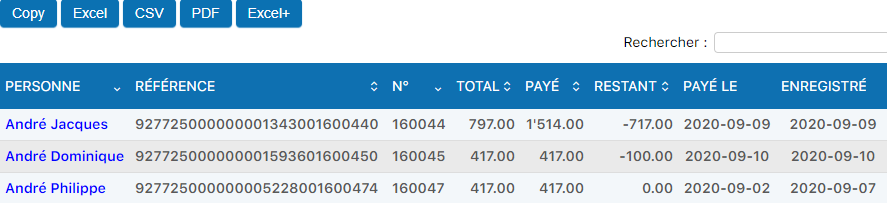
Information displayed
The payment list shows you the BVR details (or similar details) for each bank payment processed, including:
- Payment date — When the money was received by the bank
- Amount — The amount paid in CHF
- Reference number — The BVR number or other identifier used for the payment
- Member — The name or number of the member who paid
- Status — Confirmation that the payment has been correctly assigned to an invoice
2 Use the list for your accounting
💡 Tip
Use this list to generate monthly or quarterly reports. You can export the data or print it for archiving. This list serves as official proof of payments received for your internal or external accounting audits.
Bank reconciliation
Regularly compare Plugin.ch's payment list with your bank statements to make sure all payments received have been correctly recorded in the system. This reconciliation is an essential internal control practice.
Tracking unpaid amounts
By comparing the invoice list with the payment list, you can quickly identify invoices that have not yet been paid. This makes it easier to send reminders to members and manage unpaid amounts.
Documentation for treasury
The treasurer or administrator can use this list to keep a complete log of incoming financial flows. It is an essential reference document for quarterly or annual financial reports.
3 Display and filtering options
Changing the date range
You can adjust the start and end dates to display payments for a specific period (a month, a quarter, a year). The button “Change period” opens an intuitive date picker for you.
Sorting and organization
Columns are generally sortable. Click a column header (date, amount, member name, etc.) to reorder the list according to your needs.
Export and printing
Most lists in Plugin.ch offer the ability to export data as CSV or PDF, or to print them directly. Use these options to keep archives or share information with your accountant.
In short
- Access : INVOICE menu → LIST OF PAYMENTS
- Purpose : View all bank payments received and processed
- Flexibility : Choose the display period with “Change period”
- Documentation : Print or export for accounting archiving
- Control : Regularly reconcile the list with your bank statement
Plugin.ch Tutorial — Process payments